26 minutes
Jenkins X Orchestration: More than Tekton on Steroids
We may know Jenkins X as a new pure CI/CD cloud native implementation different than Jenkins. It is based on the use of Kubernetes Custom Resource Definitions (CRD’s) to experience a seamless execution of CI/CD pipelines. This happens by leveraging the power of Kubernetes in terms of scalability, infrastructure abstraction and velocity.
The new main approach of Jenkins X is about a serverless experience, because there is no more traditional Jenkins engine running. So, it relies on a CI/CD pipeline engine that can run on any standard Kubernetes deployment. This engine is the Tekton CD project , a former Google project that is also - like Jenkins X - part of the Continuous Delivery Foundation.
In this post, we are showing the power of Tekton as a decoupled CI/CD pipeline engine execution. But more important, why an orchestration pipeline platform is practically required to design, configure and run your pipelines for the whole Software Delivery process. This orchestration platform is Jenkins X.
The Tekton base
Why then is Tekton a cool CI/CD engine?
First of all, Tekton is built on and for Kubernetes. This means that containers are the building blocks of any pipeline definition and execution. Kubernetes orchestrates the container’s magic. One step, one container. But it’s more than that:
- Everything is decoupled. So for example, a group of steps, or any pipeline resource can be shared and reused accross different pipeline executions.
- Kubernetes is the platform, meaning that pipelines can be deployed and executed basically anywhere.
- Sequential execution of
Tasksdefines aPipeline. So creating a pipeline conceptually is as easy as defining the order of the tasks that we want to run and that may be already deployed in our Kubernetes cluster. - Any task can be run by instantiating it from a parametrized
TaskRun. Because every previous task can be parametrized, reusing them is just a matter of calling the right task with a specific parameter. Again, decoupling and reusing. - Pipelines usually consume different resources like code, containers, files, etc. So Tekton uses
PipelineResourcesas inputs and outputs between tasks to execute the pipeline workflow. That means that pipeline resources can be shared between pipelines in a descriptive way. - Every pipeline component is a CRD, so pipeline execution is a matter of containers orchestration, something that Kubernetes does really well and pretty fast. It is reliable, stable, scalable and performant.
Let’s try to understand Tekton pipelines decoupled architecture in the following diagram :
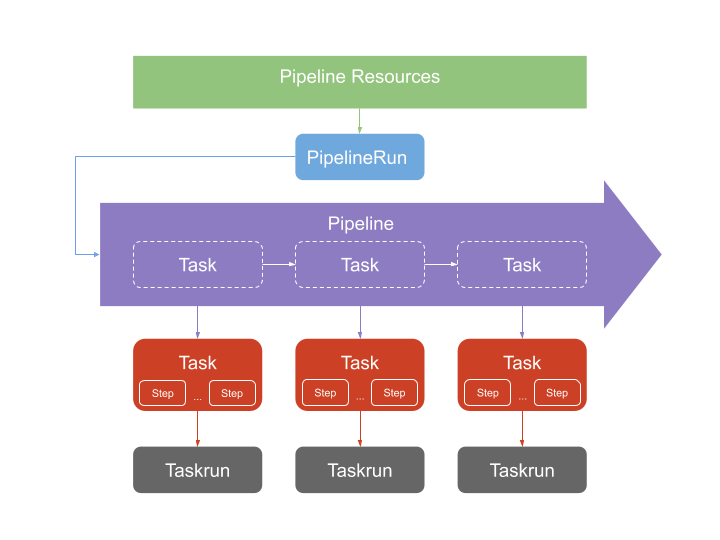
In terms of scalability, it’s a nice way to isolate objects that can be reused easily, right?
Decoupling CI/CD is good, but…
Tekton then is about the power of a decoupled CI/CD engine, which has many advantages. But no one said that defining decoupled CI/CD pipelines was an easy task. It can be complex from a conceptual point of view if you don’t change your mindset. Traditionally, we’ve been defining pipelines as different stages with their current steps to be executed. So, everything is only about how to orchestrate stages as sequential or parallel tasks, configuring parameters or conditions into the pipeline. Let’s say that CI/CD has a monolithic mindset to configure and define pipelines.
If we start designing reusable components, then the resources, the pipeline flow, the execution parametrization and then feeding all components back and forth… This can be messy and error prone till having the complete decoupled pipeline map configured.
An orchestration engine to manage pipelines
We might think about how to orchestrate this. Let’s then think about three decoupling best practices for pipelines in containerized ecosystems:
- The CI/CD execution must be flexible, reusable and decoupled.
- The pipeline orchestration must be manageable, understandable and easy to deploy.
- Resources configuration for pipeline components needs to be standardized and easy to manage.
CI/CD in not only about designing automation pipelines to deliver software. It is also about managing and providing all resources required for automation execution. In Kubernetes we will need to deal also with different objects like Secrets, ServiceAccounts, PersistentVolumes, ConfigMaps, Ingress, etc.
To focus on CI/CD pipelines, resources management should be an easy task.
An example to understand Tekton and Jenkins X orchestration
We are using an example of building an application by defining and running CI/CD pipelines with standalone Tekton. Then, we are taking the same application to see how Jenkins X pipelines, using Tekton, generate similar objects but from a different focus. It will show how pipeline orchestration capabilities are applied to a decoupled CI/CD pipeline engine, no matter how I need to deal with platform or infrastructure resources.
To do that we are using a well known Spring Petclinic example Spring Boot application. And let’s use a repo that is using traditional Jenkins pipeline to build the application, create a Docker container and deploy into Kubernetes cluster.
In my traditional Jenkins example I use two pipelines in fact that are automated using CloudBees Core Cross Team Collaboration feature:
- Repo with a Jenkins pipeline to build the app, the Docker container and push it into Docker Registry
- A simple Jenkins pipeline repo to deploy the previous container published
But in our case, we are putting those pipeline steps into one pipeline to do the build and deploy. First with a “pure Tekton” pipeline definition, and later using Jenkins X serverless pipelines.
The pure Tekton way
So let’s try to configure and execute the pipeline from a pure Tekton pipeline point of view. That means:
- Creating
PipelineResourcesthat are going to be used byTasks - Defining and creating
Tasksthat contain the steps to be executed in thePipeline - Defining and creating the
Pipelinethat orchestrates the execution ofTaskswithResources - Creating the
PipelineRun - Installing required Kubernetes resources, like
Secrets,ServiceAccountsor permissions, in order to execute required steps within right containers (e.g. secrets used by Kaniko builder)
I already created a GitHub Repo with all YAML files needed (except secrets, which are explained in the README file). But let’s go through them.
We can create a YAML file with all Tasks objects and the Pipeline definition. We can call this file petclinic-pipeline.yaml:
apiVersion: tekton.dev/v1alpha1
kind: Task
metadata:
  name: build-maven
spec:
  inputs:
    resources:
      - name: workspace
        type: git
    params:
      - name: workingDir
        description: Working directory parameter
        default: /workspace/workspace
  outputs:
    resources:
      - name: workspace
        type: git
  steps:
    - name: maven-build
      image: gcr.io/cloud-builders/mvn:3.5.0-jdk-8
      workingDir: ${inputs.params.workingDir}
      command: ["mvn"]
      args:
        - "clean"
        - "install"
    - name: ls-target
      image: ubuntu
      command:
        - "ls"
      args:
        - "-la"
        - "/workspace/workspace/target"
---
apiVersion: tekton.dev/v1alpha1
kind: Task
metadata:
  name: build-kaniko
spec:
  inputs:
    resources:
      - name: workspace
        type: git
        targetPath: petclinic
    params:
      - name: workingDir
        description: Working directory parameter
        default: /workspace/petclinic
      - name: DockerFilePath
        decription: Path to DockerFile
        default: /workspace/petclinic/Dockerfile
  outputs:
    resources:
      - name: dockerImage
        type: image
  steps:
    - name: kaniko-build
      image: gcr.io/kaniko-project/executor:latest
      command:
        - /kaniko/executor
      args:
        - "--dockerfile=${inputs.params.DockerFilePath}"
        - "--context=${inputs.params.workingDir}"
        - "--destination=${outputs.resources.dockerImage.url}"
      env:
        - name: GOOGLE_APPLICATION_CREDENTIALS
          value: /secret/kaniko-secret.json
      volumeMounts:
        - name: kaniko-secret
          mountPath: /secret
  volumes:
    - name: kaniko-secret
      secret:
        secretName: emea-sa-secret
---
apiVersion: tekton.dev/v1alpha1
kind: Task
metadata:
  name: deploy-kubectl
spec:
  inputs:
    resources:
      - name: workspacedeploy
        type: git
    params:
      - name: workingDir
        description: Working directory parameter
        default: /workspace/workspacedeploy
      - name: deployFile
        description: Deployment file for app
        default: test-deploy.yaml
        # Just a parameter to check the depployment name, because one step will force redeploy
      - name: deploymentName
        description: The K8s deployment object name
        default: petclinic
  steps:
    - name: kubectl-clean
      image: gcr.io/cloud-builders/kubectl:latest
      workingDir: ${inputs.params.workingDir}
      command: ["/bin/bash"]
      args:
        - -c
        - MYDEPLOY=$(kubectl get deployments -l app=petclinic -o name | awk -F'/' '{print $2}');
        - if [ "$MYDEPLOY" = "${inputs.params.deploymentName}" ];
        - then kubectl delete deployment $MYDEPLOY;
        - fi
    - name: kubectl-deploy
      image: gcr.io/cloud-builders/kubectl:latest
      workingDir: ${inputs.params.workingDir}
      command: ["kubectl"]
      args:
        - apply
        - -f
        - ${inputs.params.deployFile}
---
apiVersion: tekton.dev/v1alpha1
kind: Pipeline
metadata:
  name: petclinic-pipeline
spec:
  resources:
    - name: source-repo
      type: git
    - name: docker-container
      type: image
    - name: deploy-repo
      type: git
  tasks:
    - name: petclinic-maven
      taskRef:
        name: build-maven
      resources:
        inputs:
          - name: workspace
            resource: source-repo
        outputs:
          - name: workspace
            resource: source-repo
    - name: petclinic-kaniko
      taskRef:
        name: build-kaniko
      resources:
        inputs:
          - name: workspace
            resource: source-repo
            from:
              - petclinic-maven
        outputs:
          - name: dockerImage
            resource: docker-container
    - name: petclinic-deploy
      taskRef:
        name: deploy-kubectl
      runAfter:
        - petclinic-kaniko
      resources:
        inputs:
          - name: workspacedeploy
            resource: deploy-repo
      params:
        - name: deployFile
          value: test-deploy-secret.yaml
Then we can define also a file pipeline-resources.yaml with all required PipelineResources objects needed:
apiVersion: tekton.dev/v1alpha1
kind: PipelineResource
metadata:
  name: petclinic-git
spec:
  type: git
  params:
    - name: url
      value: https://github.com/dcanadillas/petclinic-kaniko.git
---
apiVersion: tekton.dev/v1alpha1
kind: PipelineResource
metadata:
  name: petclinic-image
spec:
  type: image
  params:
    - name: url
      value: eu.gcr.io/emea-sa-demo/petclinic-kaniko:latest
---
apiVersion: tekton.dev/v1alpha1
kind: PipelineResource
metadata:
  name: petclinic-deploy
spec:
  type: git
  params:
    - name: url
      value: https://github.com/dcanadillas/petclinic-kaniko-deploy.git
As PipelineResources we are using the two GitHub repositories from the original repos as inputs (one for the application and the other for deployment definitions), and one container image as output to be built.
Next, let’s define the PipelineRun, that executes and instantiate the pipeline, in a file petclinic-run.yaml:
apiVersion: tekton.dev/v1alpha1
kind: PipelineRun
metadata:
  name: petclinic-pipelinerun
spec:
  pipelineRef:
    name: petclinic-pipeline
  serviceAccount: 'default'
  serviceAccounts:
    - taskName: petclinic-deploy
      serviceAccount: tekton-deployment
  resources:
  - name: source-repo
    resourceRef:
      name: petclinic-git
  - name: docker-container
    resourceRef:
      name: petclinic-image
  - name: deploy-repo
    resourceRef:
      name: petclinic-deploy
In the PipelineRun object it’s important to understand that it is intended in the way of defining the specific running instance of a deployed pipeline. It’s the right place to assign running input/output parameter values, specify serviceAccounts to be used, or referencing the right PipelineResources to be used.
Once we have the YAML definitions, it’s only a matter of Kubernetes deployment of the Tekton CRD objects. We can use then kubectl command line tool to deploy first the two YAML files with PipelineResources, Tasks and Pipeline:
$ kubectl apply -f petclinic-resources.yaml,petclinic-pipeline.yaml
pipelineresource.tekton.dev/petclinic-git created
pipelineresource.tekton.dev/petclinic-image created
pipelineresource.tekton.dev/petclinic-deploy created
task.tekton.dev/build-maven created
task.tekton.dev/build-kaniko created
task.tekton.dev/deploy-kubectl created
pipeline.tekton.dev/petclinic-pipeline created
We can see then the objects already deployed, as CRDs objects.
$ kubectl get tasks,pipelines,pipelineresources
NAME                             AGE
task.tekton.dev/build-kaniko     2s
task.tekton.dev/build-maven      2s
task.tekton.dev/deploy-kubectl   2s

NAME                                     AGE
pipeline.tekton.dev/petclinic-pipeline   2s

NAME                                           AGE
pipelineresource.tekton.dev/petclinic-deploy   2s
pipelineresource.tekton.dev/petclinic-git      2s
pipelineresource.tekton.dev/petclinic-image    2s
And we can check the pipeline to be executed:
$ kubectl describe pipeline.tekton.dev/petclinic-pipeline
Name:         petclinic-pipeline
Namespace:    tekton-pipelines
Labels:       <none>
Annotations:  kubectl.kubernetes.io/last-applied-configuration:
                {"apiVersion":"tekton.dev/v1alpha1","kind":"Pipeline","metadata":{"annotations":{},"name":"petclinic-pipeline","namespace":"tekton-pipelin...}}
API Version:  tekton.dev/v1alpha1
Kind:         Pipeline
Metadata:
  Creation Timestamp:  2019-07-13T10:19:12Z
  Generation:          1
  Resource Version:    22835394
  Self Link:           /apis/tekton.dev/v1alpha1/namespaces/tekton-pipelines/pipelines/petclinic-pipeline
  UID:                 a8d4e6ca-a557-11e9-b2c9-42010a8400ab
Spec:
  Resources:
    Name:  source-repo
    Type:  git
    Name:  docker-container
    Type:  image
    Name:  deploy-repo
    Type:  git
  Tasks:
    Name:  petclinic-maven
    Resources:
      Inputs:
        Name:      workspace
        Resource:  source-repo
      Outputs:
        Name:      workspace
        Resource:  source-repo
    Task Ref:
      Name:  build-maven
    Name:    petclinic-kaniko
    Resources:
      Inputs:
        From:
          petclinic-maven
        Name:      workspace
        Resource:  source-repo
      Outputs:
        Name:      dockerImage
        Resource:  docker-container
    Task Ref:
      Name:  build-kaniko
    Name:    petclinic-deploy
    Params:
      Name:   deployFile
      Value:  test-deploy-secret.yaml
    Resources:
      Inputs:
        Name:      workspacedeploy
        Resource:  deploy-repo
    Run After:
      petclinic-kaniko
    Task Ref:
      Name:  deploy-kubectl
Events:      <none>
Pipeline object is going to execute in order the tasks already existing in K8s cluster: build-maven, build-kaniko and deploy-kubectl. And for that we are setting as inputs and outputs the different PipelineResources.
But we are using some resources expected in the cluster that are not created at pipeline definition, like Secrets for pushing into private Docker Registry (GCR in my case), ServiceAccount, Roles and RoleBindings to deploy in Kubernetes with the specific permissions. I am not focusing on doing this at this post, but you can read how to do it in my original repo documentation.
Now, running the pipeline is just about deploying the PipelineRun definition in our pipeline-run.yaml file:
kubectl apply -f petclinic-run.yaml
A Tekton CRD is then created to run the pipeline.
pipelinerun.tekton.dev/petclinic-pipelinerun created
Different things are going to happen in this case:
- The
PipelineRunis going to create aTaskRunperTask. Than means that every stage of the pipeline is going to be executed within theTaskdefinition already deployed, depending on thePipelineflow created - Every
TaskRunis going to be executed in a KubernetesPod, using the containers specified in the differentStepsinTasks. Remember about Tekton: One step. One container. PipelineResourcesare just “consumed or produced” byTasksdepending on the parameters used duringTaskRuns- Different
ServiceAccountsare going to be used forTasksdepending on the definition of thePipelineRun(it makes sense that different roles are needed for different tasks)
So, if we take a look about our execution after the complete run:
$ kubectl get pods
NAME                                                      READY   STATUS      RESTARTS   AGE
petclinic-6f668b59b5-w8zrr                                1/1     Running     0          21s
petclinic-pipelinerun-petclinic-deploy-54kws-pod-c5a511   0/3     Completed   0          1m
petclinic-pipelinerun-petclinic-kaniko-s4nnw-pod-67721d   0/4     Completed   0          1m
petclinic-pipelinerun-petclinic-maven-9gnpf-pod-fa757f    0/5     Completed   0          4m
tekton-pipelines-controller-6b565f9859-knqsb              1/1     Running     0          8h
tekton-pipelines-webhook-7f47c995cd-db2rv                 1/1     Running     0          8h
And we can check that TaskRuns where created:
$ kubectl get taskruns
NAME                                           SUCCEEDED   REASON      STARTTIME   COMPLETIONTIME
petclinic-pipelinerun-petclinic-deploy-54kws   True        Succeeded   2h          2h
petclinic-pipelinerun-petclinic-kaniko-s4nnw   True        Succeeded   2h          2h
petclinic-pipelinerun-petclinic-maven-9gnpf    True        Succeeded   2h          2h
Looking inside at one of them we can see the execution status and completion:
$ kubectl describe taskrun/petclinic-pipelinerun-petclinic-kaniko-s4nnw

[...]

Status:
  Completion Time:  2019-07-15T18:13:25Z
  Conditions:
    Last Transition Time:  2019-07-15T18:13:25Z
    Message:               All Steps have completed executing
    Reason:                Succeeded
    Status:                True
    Type:                  Succeeded
  Pod Name:                petclinic-pipelinerun-petclinic-kaniko-s4nnw-pod-67721d
  Start Time:              2019-07-15T18:12:55Z
  Steps:
    Name:  kaniko-build
    Terminated:
      Container ID:  docker://f077cc23c848bb5a937201719543db01d8cfd2712dabfb577df4b02b8c32b704
      Exit Code:     0
      Finished At:   2019-07-15T18:13:24Z
      Reason:        Completed
      Started At:    2019-07-15T18:13:09Z
    Name:            image-digest-exporter-kaniko-build-ldh8q
    Terminated:
      Container ID:  docker://106f2819a96246761eed0486e2f66428dafb38cdff291c3004e9e75d9a245963
      Exit Code:     0
      Finished At:   2019-07-15T18:13:24Z
      Message:       []
      Reason:        Completed
      Started At:    2019-07-15T18:13:12Z
    Name:            create-dir-workspace-sgtdd
    Terminated:
      Container ID:  docker://f80a5a1da2898e78edcaf2110d0adb304131ff7f07a14b4e40ab8a03a9f69167
      Exit Code:     0
      Finished At:   2019-07-15T18:13:13Z
      Reason:        Completed
      Started At:    2019-07-15T18:13:06Z
    Name:            source-copy-workspace-8dmsp
    Terminated:
      Container ID:  docker://081e363b08f7fe1d8bd21efa36c670531a6cbc5debf09b2662d8b27340d9ad48
      Exit Code:     0
      Finished At:   2019-07-15T18:13:14Z
      Reason:        Completed
      Started At:    2019-07-15T18:13:06Z
Events:              <none>
Finally, the application should have been deployed. Let’s check:
$ kubectl get svc
NAME                          TYPE           CLUSTER-IP      EXTERNAL-IP     PORT(S)          AGE
petclinic-service             LoadBalancer   10.31.240.225   35.240.80.216   9090:31261/TCP   12m
tekton-pipelines-controller   ClusterIP      10.31.254.32    <none>          9090/TCP         11d
tekton-pipelines-webhook      ClusterIP      10.31.242.231   <none>          443/TCP          11d

We then confirmed that this kind of pipeline definition and execution in Kubernetes can be extremely powerful in terms of reusability and extensibility. We’ve just deployed tasks definitions, ordering and resources descriptions, and running specification. Everything is about playing with Cloud Native resources to deal with CI/CD pipeline objects and executions.
But let’s face it. This is not a very easy way of executing pipelines. Powerful, but complex from a conceptual pipeline design.
Playing with Jenkins X Serverless Pipelines
We can think about orchestrating the previous application pipeline with Tekton to simplify it’s usage and make it “manageable”. Jenkins X is a very good solution to do that, because:
- Jenkins X build packs give you pre-set pipelines (among other things) for your applications. You can then start with a prepared and curated conceptual design that is easy to manage.
- Jenkins X is not a pipeline engine, it’s a CI/CD solution. So all resources like Git repos, users,
serviceAccounts, environmentnamespaces,ingressrules, Docker Registry credentials, etc. are already configured to be able to orchestrate pipeline execution. - Configuring or extending pipeline definitions is just a matter of defining the flow of stages with their steps/containers to be executed. And Tekton is used automatically to decouple run definition and execution. Monolithic abstraction, decoupled execution.
- Jenkins X Pipelines simplify any pipeline process to develop features, release or promote/deploy your code through environments.
To understand what we mean about Tekton orchestration, let’s try to simulate the same tasks and steps in our previous Tekton example, but defining a basic Jenkins X serverless pipeline without using build packs.
NOTE: Don’t think about this as a standard way to work with Jenkins X. We are showing first a standalone jenkins-x.yml pipeline to demonstrate how Tekton objects are created and orchestrated automatically by Jenkins X.
Jenkins X cluster creation and installation it’s just a matter of minutes. So, to start executing pipelines we’ll start to deploy a Jenkins X cluster from scracth in GKE after installing the Jenkins X CLI (showing parameters instead of values):
jx create cluster gke \
--cluster-name ${JX_CLUSTER} \
--default-admin-password ${MYPWD} \
--environment-git-owner ${GH_ORG} \
--min-num-nodes 3 --max-num-nodes 5 \
--machine-type n1-standard-2 \
--project-id ${GCP_PROJECT} --zone europe-west1-c \
--default-environment-prefix ${JX_CLUSTER} \
--git-provider-kind github \
--git-username ${GH_USER} \
--git-api-token ${GH_APITOKEN} \
--tekton \
--no-tiller \
-b
Once having the Jenkins X installation (serverless mode with Prow and Tekton), you can check that Tekton CRDs are already there:
$ kubectl get crd
NAME                                           CREATED AT
[...]
pipelineresources.tekton.dev                   2019-07-10T11:38:50Z
pipelineruns.tekton.dev                        2019-07-10T11:38:50Z
pipelines.tekton.dev                           2019-07-10T11:38:50Z
[...]
taskruns.tekton.dev                            2019-07-10T11:38:50Z
tasks.tekton.dev                               2019-07-10T11:38:50Z
[...]
Right now, let’s try to simulate the Tekton pipeline that we executed before from a “standalone” Jenkins X YAML pipeline. This means, as mentioned before, that we are not using any Jenkins X Build Packs.
If we clone the same petclinic-kaniko repo into a local directory petclinic-jenkins-x we can do the following (working from local):
- Deleting any Git repo reference from the local cloned directory with
rm -r ./.git*so we are working for sure from a local copy - Create in the local directory the following
jenkins-x.ymlfile that simulates demaven-build,kaniko-buildandkubectl-deploytasks from our previous Tekton example (for simplicity we are not adding the step used before to check deployment):
  buildPack: none
  pipelineConfig:
    pipelines:
      release:
        pipeline:
          stages:
            - name: Maven Build
              agent:
                image: maven
              steps:
                - command: mvn
                  args:
                    - clean
                    - install
            - name: Kaniko Build
              agent:
                image: gcr.io/kaniko-project/executor:latest
              steps:
                - command: /kaniko/executor
                  args:
                    - "--dockerfile=Dockerfile"
                    - "--context=/workspace/source"
                    - "--destination=eu.gcr.io/emea-sa-demo/petclinic-kaniko:latest"
            - name: Kubectl Deploy
              agent:
                image: gcr.io/cloud-builders/kubectl:latest
              steps:
                - command: kubectl
                  args:
                    - apply
                    - -f
                    - https://github.com/dcanadillas/petclinic-kaniko-deploy/blob/master/test-deploy.yaml?raw=true
                    - -n
                    - jx-staging
- Import the project with Jenkins X from the local directory:
  $ jx import --git-username dcanadillas --org jx-dcanadillas --name petclinic-jenkins-x -m YAML
  [...]
  ? Git user name: dcanadillas
  The directory /Users/david/Documents/Workspace/Technologists/petclinic-kaniko is not yet using git
  ? Would you like to initialise git now? Yes
  ? Commit message:  Initial import
  [...]
  ? Using organisation: jx-dcanadillas
  ? Enter the new repository name:  petclinic-jenkins-x
  [...]
NOTE: We could have imported first the project and then changed the jenkins-x.yml. In that case Jenkins X would have detected to apply a Maven Build Pack doing the first run with it. But I wanted to force Jenkins X to not recognize any Build Pack from the beggining, so there is no pipeline execution different than the one we want to simulate.
Then the first pipeline execution is automatically run, because Jenkins X creates the GitHub repo with its webhook for you. The status of the execution can be seen by:
$ jx get activity -f petclinic -w
[...]
jx-dcanadillas/petclinic-jenkins-x/master #2                   4m24s    4m17s Succeeded
  Maven Build                                                  4m24s    2m10s Succeeded
    Credential Initializer 8xhk4                               4m24s       0s Succeeded
    Working Dir Initializer 7c8l2                              4m23s       0s Succeeded
    Place Tools                                                4m22s       0s Succeeded
    Git Source Jx Dcanadillas Petclinic Jenkin Rhg88 Jhl       4m21s       2s Succeeded https://github.com/jx-dcanadillas/petclinic-jenkins-x
    Git Merge                                                  4m20s       2s Succeeded
    Step2                                                      4m20s     2m5s Succeeded
    Source Mkdir Jx Dcanadillas Petclinic Jenkin Rhg88 K       4m20s     2m6s Succeeded
    Source Copy Jx Dcanadillas Petclinic Jenkin Rhg88 Z2       4m20s     2m6s Succeeded
  Kaniko Build                                                 1m38s      15s Succeeded
    Credential Initializer Lpcwz                               1m38s       0s Succeeded
    Working Dir Initializer Ww5lp                              1m37s       0s Succeeded
    Place Tools                                                1m36s       0s Succeeded
    Create Dir Workspace Zvlmw                                 1m35s       0s Succeeded
    Source Copy Workspace P5n28                                1m35s       2s Succeeded
    Step2                                                      1m34s      10s Succeeded
    Source Mkdir Jx Dcanadillas Petclinic Jenkin Rhg88 R       1m34s      10s Succeeded
    Source Copy Jx Dcanadillas Petclinic Jenkin Rhg88 Rg       1m33s      10s Succeeded
  Kubectl Deploy                                                1m5s      58s Succeeded
    Credential Initializer Hrmkx                                1m5s       0s Succeeded
    Working Dir Initializer Wgqh9                               1m4s       0s Succeeded
    Place Tools                                                 1m3s       0s Succeeded
    Create Dir Workspace J9wgg                                  1m2s       0s Succeeded
    Source Copy Workspace K8nz4                                 1m1s       1s Succeeded
    Step2                                                         9s       2s Succeeded
As we can see in the activity logs, three stages are executed, which are corresponding to their Tekton Tasks. If we search for Tekton components, we can check that everything is created by Jenkins X for the Tekton engine execution:
$ kubectl get tasks,tasks,taskruns,pipeline,pipelineruns
NAME                                                                      AGE
task.tekton.dev/jx-dcanadillas-petclinic-jenkin-rhg88-kaniko-build-2      7m
task.tekton.dev/jx-dcanadillas-petclinic-jenkin-rhg88-kubectl-deploy-2    7m
task.tekton.dev/jx-dcanadillas-petclinic-jenkin-rhg88-maven-build-2       7m

NAME                                                                               AGE
taskrun.tekton.dev/jx-dcanadillas-petclinic-jenkin-rhg88-2-kaniko-build-kpk8v      4m
taskrun.tekton.dev/jx-dcanadillas-petclinic-jenkin-rhg88-2-kubectl-deploy-scs4r    4m
taskrun.tekton.dev/jx-dcanadillas-petclinic-jenkin-rhg88-2-maven-build-d42f4       7m

NAME                                                          AGE
pipeline.tekton.dev/jx-dcanadillas-petclinic-jenkin-rhg88-2   7m

NAME                                                             AGE
pipelinerun.tekton.dev/jx-dcanadillas-petclinic-jenkin-rhg88-2   7m
There they are. The same components that were created “manually” in our previous Tekton example. Truth is that Tasks configurations in this case use more parameters inside (DOCKER_REGISTRY, REPO_OWNER, PIPELINE_KIND, BUILD_NUMBER, APP_NAME, VERSION… and more) that are configured by Jenkins X. But that is the thing. Just because Jenkins X is orchestrating the pipeline execution from a simpler definition it’s abstracting some configurations for you and using some parameters to make it easier.
If we check the pods used by the pipeline execution we will find again three of them (one pod per Tekton task):
$ kubectl get pod -n jx
NAME                                                                      READY   STATUS      RESTARTS   AGE
[...]
jx-dcanadillas-petclinic-jenkin-rhg88-2-kaniko-build-kpk8v-pod-4dd505     0/6     Completed   0          3m41s
jx-dcanadillas-petclinic-jenkin-rhg88-2-kubectl-deploy-scs4r-pod-a2f48a   0/4     Completed   0          2m52s
jx-dcanadillas-petclinic-jenkin-rhg88-2-maven-build-d42f4-pod-432bb5      0/6     Completed   0          6m14s
[...]                                              1/1     Running     0          5d10h
tekton-pipelines-controller-687cfbcc89-69jht                              1/1     Running     0          5d10h
tekton-pipelines-webhook-7fd7f8cdcc-pqv4c                                 1/1     Running     0          5d10h
tide-5f8fb5964c-29pgt                                                     1/1     Running     0          5d10h
And we can check that same application has been deployed in the namespace jx-staging:
$ kubectl get svc petclinic-service -n jx-staging
NAME                TYPE           CLUSTER-IP     EXTERNAL-IP     PORT(S)          AGE
petclinic-service   LoadBalancer   10.23.240.64   35.195.126.19   9090:31194/TCP   10m

We can conclude about the following about simulating the same Tekton configuration with Jenkins X Pipelines:
- CI/CD pipeline was designed in one YAML file of a couple of lines, instead of defining several YAML files with cross-reference definitions (we could have defined one YAML file for the Tekton example, but would have been very big file with lots of lines of code and not very manageable).
- Jenkins X, from that monilithic simple definition, creates automatically all Tekton decoupled components (
Tasks,Pipeline,PipelineResources,PipelineRuns, etc.). - There is no need to define any secret or serviceAccount. Jenkins X configures the platform parameters automatically when installing, passing those parameters to the pipeline Tekton components at execution creation. You can also change default parameters in the pipeline with an easy commang line execution
jx create variable, or just adding them in the YAML file. - It is much easier to create a Jenkins X pipeline to orchestrate Tekton components than creating the isolated components by itself and then deploying the execution.
- All GitHub “dirty work” like webhooks, credentials or updates required are already configured by Jenkins X to work only on code changes.
- We could see also that pipeline execution is faster because Jenkins X takes care about artifact caching and optimizing Kubernetes resources used.
Let’s use the following diagram to show how a Jenkins X pipeline definition is translated into Tekton components, like also happened in our example:

The pure Jenkins X way
But let’s be honest. If we want to take advantadge of a real pipeline orchestration platform like Jenkins X, previous configuration of jenkins-x.yml is not the best way to go. That was intended to understand how a Jenkins X pipeline definition is abstracting Tekton components to run CI/CD pipelines.
The real value of a CI/CD pipeline orchestration platform is about something else than abstracting a powerful decoupled CI/CD engine like Tekton. So let’s try to understand what I am talking about by doing CI/CD with the same petclinic-kaniko repo in a pure Jenkins X way using Jenkins X build packs.
As shown before, for demonstration purposes I am cloning first the original repo and then importing from local to to automatically create from Jenkins X a new repo in GitHub. I could import directly from the GitHub repo, creating then a new commit with the changes to continue to do CI/CD with Jenkins X (for example changing my old Jenkinsfile for a new jenkins-x.yaml).
Because I don’t want to change the original repo, let’s do the following:
- Clone original repo from the terminal with
git clone https://github.com/dcanadillas/petclinic-kaniko petclinic-jx. - Remove git references
rm -rf petclinic-jx/.git*. - Now, create Jenkins X project by importing from the local repo into a new GitHub repository:
jx import --git-username dcanadillas --org jx-dcanadillas --name petclinic-jx -m YAML
Note that we are using -m YAML to force Jenkins X creating a new Jenkins X serverless pipeline project instead of a Static Jenkinsfile one.
Different things are going on when importing the project with Jenkins X:
- Creates a local git repo (similar to
git init). - Selects a Draft build pack from Jenkins X. (In this case takes a maven build pack).
- Pushes the new repository with changes applied from the build pack to a repo in the GitHub organization specified in the
--orgparameter. - Creates a GitHub webhook for Jenkins X to be able to trigger pipelines automatically with any code change.
- Runs the pipeline to build the application and promotes to Staging using GitOps.
Basically, Jenkins X already configured the CI/CD pipeline just by importing the project. So now there is already a pipeline running. All steps executed by the pipeline build can be seen with jx get activity -f petclinic-jx -w . Once it succeeded:
$ jx get activity -f petclinic-jx --build 1
STEP                                                 STARTED AGO DURATION STATUS
jx-dcanadillas/petclinic-jx/master #1                     55m57s    3m59s Succeeded Version: 0.0.1
  from build pack                                         55m57s    3m59s Succeeded
    Credential Initializer Dk42x                          55m57s       1s Succeeded
    Working Dir Initializer Fqgpx                         55m56s       0s Succeeded
    Place Tools                                           55m55s       0s Succeeded
    Git Source Jx Dcanadillas Petclinic Jx Mas Rt8qq      55m54s       2s Succeeded https://github.com/jx-dcanadillas/petclinic-jx
    Git Merge                                             55m53s       2s Succeeded
    Setup Jx Git Credentials                              55m52s       2s Succeeded
    Build Mvn Deploy                                      55m52s    2m33s Succeeded
    Build Skaffold Version                                55m52s    2m34s Succeeded
    Build Container Build                                 55m52s    2m49s Succeeded
    Build Post Build                                      55m52s    2m50s Succeeded
    Promote Changelog                                     55m51s    2m54s Succeeded
    Promote Helm Release                                  55m51s     3m0s Succeeded
    Promote Jx Promote                                    55m51s    3m53s Succeeded
  Promote: staging                                        52m43s      45s Succeeded
    PullRequest                                           52m43s      45s Succeeded  PullRequest: https://github.com/dcanadillas-kube/environment-dcanadillas-cloudbees-staging/pull/6 Merge SHA: f765c6fe2d91bff40d4fcbc30641cd92b35849a9
    Update                                                51m58s       0s Succeeded
The pipeline created by Jenkins X has just two Tekton tasks with different steps. The first Tekton task from build pack and a second task Promote: Staging. This just comes from the pipeline defined by Jenkins X:
$ cat jenkins-x.yml
buildPack: maven
It’s a one line pipeline that it’s just “inheriting” from the maven build pack pipeline.
Bottom line here is that build packs are templates for building your application. So developers don’t need to think about how to conceptually design the CI/CD pipelines, or components needed to manage Kubernetes in order to promote the application. But you can extend using the jenkins-x.yaml or by executing jx create step command. In this case Jenkins X already propose a pipeline lifecycle, that it is translated on how Tekton decouples the pipeline execution objects.
Coming back to our execution, the application is just automatically deployed and versioned into the Staging environment at version 0.0.1:
$ jx get version
APPLICATION      STAGING PODS URL
petclinic                1/1
petclinic-jx     0.0.1        http://petclinic-jx.jx-staging.cbjx.dcanadillas.com
In this output we can see also our previous petclinic application deployed with our previous example with the “customized” Jenkins X pipeline. And our recently deployed Jenkins X application petclinic-jx. Some differences between them are that we needed to define deployment in the first pipeline example (non-pure Jenkins X way), but there is no versioning or promotion lifecycle. In the other hand, our last application build - just by importing it with Jenkins X - it is versioned, deployed in the right environment and with an access url. This means that the Kubernetes service, deployyment and ingress have been configured automatically. And it also used GitOps promotion to track and audit all versioning and promotion environment.
But, the last application deployment wasn’t really successful:
$ jx open petclinic-jx -n jx-staging
petclinic-jx: http://petclinic-jx.jx-staging.cbjx.dcanadillas.com
We get a 503 error from the application.

If we check what is going on:
$ kubectl describe pod $(kubectl get pods -n jx-staging | awk '/petclinic-jx/ {print $1}') -n jx-staging
Name:               jx-petclinic-jx-845cbfcd88-8fvrx
Namespace:          jx-staging

[...]

  Events:
  Type     Reason     Age                   From                                                          Message
  ----     ------     ----                  ----                                                          -------
  Warning  Unhealthy  45m (x20 over 8h)     kubelet, gke-dcanadillas-cloudbee-default-pool-98606002-b9hc  Liveness probe failed: Get http://10.20.0.47:8080/actuator/health: net/http: request canceled (Client.Timeout exceeded while awaiting headers)
  Warning  Unhealthy  35m (x376 over 9h)    kubelet, gke-dcanadillas-cloudbee-default-pool-98606002-b9hc  Liveness probe failed: HTTP probe failed with statuscode: 404
  Normal   Pulled     30m (x138 over 9h)    kubelet, gke-dcanadillas-cloudbee-default-pool-98606002-b9hc  Container image "gcr.io/emea-sa-demo/petclinic-jx:0.0.1" already present on machine
  Warning  Unhealthy  5m35s (x881 over 9h)  kubelet, gke-dcanadillas-cloudbee-default-pool-98606002-b9hc  Readiness probe failed: Get http://10.20.0.47:8080/actuator/health: dial tcp 10.20.0.47:8080: connect: connection refused
  Warning  BackOff    38s (x1719 over 9h)   kubelet, gke-dcanadillas-cloudbee-default-pool-98606002-b9hc  Back-off restarting failed container
When the project was imported from Jenkins X and the build pack was applied, some components were added to the original project. Likehelm charts required to deploy and promote through environments.
Looking at previous error logs in the Pod, the problem seems to be about changing the probePath in the file petclinic-jx/charts/petclinic-jx/values.yaml. Let’s fix it. We need to change it from /actuator/health to /:
cat charts/petclinic-jx/values.yaml | sed 's/\/actuator\/health/\//g' | tee charts/petclinic-jx/values.yaml
Then, we apply the changes to the repo and the pipeline will be triggered automatically:
$ git commit -am "probePath changed to the right value"
$ git push -u origin master
[...]
To https://github.com/jx-dcanadillas/petclinic-jx.git
   b25d36b..234b99a  master -> master
Rama 'master' configurada para hacer seguimiento a la rama remota 'master' de 'origin'.
The pipeline should start running againg to build the application and promote version 0.0.2 into Staging.
$ jx get activity -f petclinic-jx -w

[...]

    Git Merge                                                  3m49s       2s Succeeded
    Setup Jx Git Credentials                                   3m49s       3s Succeeded
    Build Mvn Deploy                                           3m48s     2m5s Succeeded
    Build Skaffold Version                                     3m48s     2m6s Succeeded
    Build Container Build                                      3m48s    2m19s Succeeded
    Build Post Build                                           3m48s    2m20s Succeeded
    Promote Changelog                                          3m47s    2m24s Succeeded
    Promote Helm Release                                       3m47s    2m29s Succeeded
    Promote Jx Promote                                         3m47s    3m43s Succeeded
  Promote: staging                                             1m10s     1m6s Succeeded
    PullRequest                                                1m10s     1m6s Succeeded  PullRequest: https://github.com/dcanadillas-kube/environment-dcanadillas-cloudbees-staging/pull/7 Merge SHA: ced0df09abbc18b002114a28640901f5261da6c3
    Update                                                        4s       0s Succeeded
    Promoted                                                      4s       0s Succeeded  Application is at: http://petclinic-jx.jx-staging.cbjx.dcanadillas.com
Checking then that the new version 0.0.2 is deployed:
$ jx get version
APPLICATION      STAGING PODS URL
petclinic                1/1
petclinic-jx     0.0.2   1/1  http://petclinic-jx.jx-staging.cbjx.dcanadillas.com
And opening the new version:
$ jx open petclinic-jx -n jx-staging

The pure Jenkins X way is about:
- Applying build pack for adopting pipeline definition experience best practices
- Complete pipeline orchestration for build and promote using Tekton native objects
- GitOps for promotion process
- Kubernetes objects management required for pipeline execution
- Pipeline extensions using easy pipeline definition with
jenkins-x.yml
It is a simpler and more complete experience of CI/CD pipelines than trying to deal with Tekton itself. It is a real orchestration of all resources to develop, build and promote from real cloud native environment.
And last, to demonstrate that all Tekton orchestration happened, let’s check all components created for all our Jenkins X executions:
$ kubectl get tasks,taskruns,pipeline,pipelinerun,pipelineresources -n jx
NAME                                                                      AGE
task.tekton.dev/dcanadillas-kube-environment-dc-d495w-from-build-pack-7   23m
task.tekton.dev/dcanadillas-kube-environment-dc-hk95j-from-build-pack-1   24m
task.tekton.dev/dcanadillas-kube-environment-dc-wm85w-from-build-pack-6   10h
task.tekton.dev/dcanadillas-kube-environment-dc-wpqsp-from-build-pack-1   10h
task.tekton.dev/jx-dcanadillas-petclinic-jenkin-lg4nw-kaniko-build-3      4h
task.tekton.dev/jx-dcanadillas-petclinic-jenkin-lg4nw-kubectl-deploy-3    4h
task.tekton.dev/jx-dcanadillas-petclinic-jenkin-lg4nw-maven-build-3       4h
task.tekton.dev/jx-dcanadillas-petclinic-jx-mas-from-build-pack-1         10h
task.tekton.dev/jx-dcanadillas-petclinic-jx-mas-ndtfh-from-build-pack-2   27m

NAME                                                                               AGE
taskrun.tekton.dev/dcanadillas-kube-environment-dc-d495w-7-from-build-pack-724xr   23m
taskrun.tekton.dev/dcanadillas-kube-environment-dc-hk95j-1-from-build-pack-w8222   24m
taskrun.tekton.dev/dcanadillas-kube-environment-dc-wm85w-6-from-build-pack-ld44v   10h
taskrun.tekton.dev/dcanadillas-kube-environment-dc-wpqsp-1-from-build-pack-2txtk   10h
taskrun.tekton.dev/jx-dcanadillas-petclinic-jenkin-lg4nw-3-kaniko-build-cjkwd      4h
taskrun.tekton.dev/jx-dcanadillas-petclinic-jenkin-lg4nw-3-kubectl-deploy-kdr9x    4h
taskrun.tekton.dev/jx-dcanadillas-petclinic-jenkin-lg4nw-3-maven-build-x2cjr       4h
taskrun.tekton.dev/jx-dcanadillas-petclinic-jx-mas-1-from-build-pack-x245x         10h
taskrun.tekton.dev/jx-dcanadillas-petclinic-jx-mas-ndtfh-2-from-build-pack-9xkrq   27m

NAME                                                          AGE
pipeline.tekton.dev/dcanadillas-kube-environment-dc-d495w-7   23m
pipeline.tekton.dev/dcanadillas-kube-environment-dc-hk95j-1   24m
pipeline.tekton.dev/dcanadillas-kube-environment-dc-wm85w-6   10h
pipeline.tekton.dev/dcanadillas-kube-environment-dc-wpqsp-1   10h
pipeline.tekton.dev/jx-dcanadillas-petclinic-jenkin-lg4nw-3   4h
pipeline.tekton.dev/jx-dcanadillas-petclinic-jx-mas-1         10h
pipeline.tekton.dev/jx-dcanadillas-petclinic-jx-mas-ndtfh-2   27m

NAME                                                             AGE
pipelinerun.tekton.dev/dcanadillas-kube-environment-dc-d495w-7   23m
pipelinerun.tekton.dev/dcanadillas-kube-environment-dc-hk95j-1   24m
pipelinerun.tekton.dev/dcanadillas-kube-environment-dc-wm85w-6   10h
pipelinerun.tekton.dev/dcanadillas-kube-environment-dc-wpqsp-1   10h
pipelinerun.tekton.dev/jx-dcanadillas-petclinic-jenkin-lg4nw-3   4h
pipelinerun.tekton.dev/jx-dcanadillas-petclinic-jx-mas-1         10h
pipelinerun.tekton.dev/jx-dcanadillas-petclinic-jx-mas-ndtfh-2   27m

NAME                                                                AGE
pipelineresource.tekton.dev/dcanadillas-kube-environment-dc-d495w   23m
pipelineresource.tekton.dev/dcanadillas-kube-environment-dc-hk95j   24m
pipelineresource.tekton.dev/dcanadillas-kube-environment-dc-wm85w   10h
pipelineresource.tekton.dev/dcanadillas-kube-environment-dc-wpqsp   10h
pipelineresource.tekton.dev/jx-dcanadillas-petclinic-jenkin         4d
pipelineresource.tekton.dev/jx-dcanadillas-petclinic-jenkin-lg4nw   4h
pipelineresource.tekton.dev/jx-dcanadillas-petclinic-jenkin-rhg88   3d
pipelineresource.tekton.dev/jx-dcanadillas-petclinic-jx-mas         10h
pipelineresource.tekton.dev/jx-dcanadillas-petclinic-jx-mas-ndtfh   27m
Some thoughts and final conclusions
Traditional Jenkins has long been one of the best CI/CD pipeline engines in terms of flexibility, standardization and adoption for most DevOps environments. But new challenges for software delivery requires scalable CI/CD architectures. Today that means using Kubernetes as a powerful abstraction of the infrastructure and the use of cloud native platforms to decouple and scale CI/CD pipelines.
Decoupling and scaling pipelines is one of the best approaches for building new modern applications and microservices. But it can be very hard to work on these decoupled objects to define a pipeline, which conceptually is a sequential and “monolithic” tasks execution.
So, Tekton is demonstrating its power of decoupling CI/CD pipelines and builds to scale. But it also needs a powerful orchestrator to simplify the complexity underneath, and even more when dealing with a platform like Kubernetes, that can also add more complexity.
I like to say that the best way to build and run CI/CD pipelines for modern (and also traditional, why not!) software applications is to make it simple and “abstract the abstraction”. I believe Jenkins X is about that. It is about applying the simplicity of traditional Jenkins pipelines from a powerful and scalable engine.
Most development companies are realizing that the next iteration of CI/CD is already here and that it’s not only about cloud native pipelines, YAML object definintions or Kubernetes containers orchestration. It is about orchestrating all the complexity while adopting best practices. We are talking about build packs templating, simple YAML pipelines, seamless Git integration, scalable team management, flexible and standard deployments, extensible platform engine, standard packaging and promotion, etc.
We’ve seen from a very basic point of view in our examples what it means to orchestrate this. And … it is more than Tekton on steroids.